Oh my...where do I begin?
If you go back to my first blog post entry for the HS132, I mentioned that this is my 2nd attempt at the model. My first attempt was lost after an HDD crash.
Well guess what? My stupid motherboard committed seppuku last Aug 12, 2012!
Yep. I guess lightning does strike twice!
GOOD thing it was only my motherboard that got fried. My HDDs were intact and I was able to recover all my files. Unfortunately, that motherboard was an LGA775 based board. I couldn't find any LGA775 boards anymore. No choice but to get a new LGA1155 based board along with a new procie and set of RAM. Oh well.
It took a lot of time to reinstall W7 as well.
Anyway, with everything back in place, I got back to finishing the texture job on the model.
Here's the final unfold:
I'm still working on the joining strips. Once I get those done, I'll start with the test build!
For the joining strips, I got rid of the textures on a copy of the main PDO file. I then added the pepakura glue tabs, with the edges set to 90degrees.
I'll be exporting this as PDF, which I'll then import to Inkscape for editing.
Here's the progress on the joining strips:
My blog about my hobby, card modeling. If you're into this kind of hobby, feel free to look around. My card model interest focuses mainly on Axis WW2 aircraft, Luft'46 models in particular.
Sunday, August 26, 2012
Henschel HS-132 - Part 18
Labels:
aircraft,
card model,
design,
Henschel,
hs-132,
luft46,
Metasequoia,
Pepakura
Thursday, August 9, 2012
Henschel HS-132 - Part 17
I'm almost....almost done with the texturing.
Just a few more adjustments, then I'll be good to go for the test build!
Here are some screenshots of the textures:
Just a few more adjustments, then I'll be good to go for the test build!
Here are some screenshots of the textures:
Labels:
aircraft,
card model,
design,
Henschel,
hs-132,
luft46,
Metasequoia,
Pepakura
Friday, July 6, 2012
Henschel HS-132 - Part 16
Labels:
aircraft,
card model,
design,
Henschel,
hs-132,
luft46,
Metasequoia,
Pepakura
Sunday, July 1, 2012
Henschel HS-132 - Part 15
It's been a while since my last update. Lots of distractions --- work, Shogun 2: Total War, M:TG 2013, etc. Well, mostly work.
Anyway, I'm done with the UV Mapping and have started working on the actual textures.
For the camo scheme, I decided to adopt one from a very famous JU87 based in North Africa -- the Snake Camo Stuka!
Here's what I have so far:
I hope you like it! :)
Anyway, I'm done with the UV Mapping and have started working on the actual textures.
For the camo scheme, I decided to adopt one from a very famous JU87 based in North Africa -- the Snake Camo Stuka!
Here's what I have so far:
I hope you like it! :)
Labels:
aircraft,
card model,
design,
Henschel,
hs-132,
luft46,
Metasequoia,
Pepakura
Sunday, June 3, 2012
Henschel HS-132 - Part 14
It took a while, but I finally got to clean up the Metaseq model.
No more @!#$D(*$@! deleted vertices and faces message from Pepakura!
Here's how the initial unfold of "half" the model looks like:
Now it's time to freeze all the mirrored objects to produce the final wire frame. Once done, I'll do that full unfold.
And finally, the picture above shows the model fully unfolded.
What follows next would be to start working on the fuselage and wing fillets/formers.
Then UV-mapping.
Oh yeah... this is turning out to be yet another model with a bazillion pieces! :)
No more @!#$D(*$@! deleted vertices and faces message from Pepakura!
Here's how the initial unfold of "half" the model looks like:
Now it's time to freeze all the mirrored objects to produce the final wire frame. Once done, I'll do that full unfold.
And finally, the picture above shows the model fully unfolded.
What follows next would be to start working on the fuselage and wing fillets/formers.
Then UV-mapping.
Oh yeah... this is turning out to be yet another model with a bazillion pieces! :)
Labels:
aircraft,
card model,
design,
Henschel,
hs-132,
luft46,
Metasequoia,
Pepakura
Saturday, June 2, 2012
Henschel HS-132 - Part 13
Now to add some final touches to the main model.
Notice anything different?
First, I added some missing pieces on the front landing gear.
Then, I decided to add gun ports.
Also added some finishing touches to the rear landing gears.
Finally, I added that thing in the tail. I don't know what it's called, but it's meant to protect the tail of the fuselage from being damaged during takeoff.
Now, before I start freezing of the mirrored objects, I'd better make sure I won't have any problems with Pepakura. Time to load the model into Pepakura!
And as expected...problems...lots of them.
X deleted vertices means that Pepakura encountered vertices that meet one or more of the following criteria:
Y deleted faces on the other hand means that a face meets one or more of the following criteria:
Z deleted objects means that Pepakura encountered an object that has no faces defined under it.
Now this is annoying. Pepakura won't tell you WHAT FRIKKIN vertices and faces and objects were deleted! Instead, Pepakura will give you hours of fun trying to find out what caused those problem.
The easiest problem to solve is the deleted objects. Just make sure that you've got no "empty" objects in your model. And yes, even if an object has a child object, but no faces defined in it, it's still considered an "empty" object.
Deleted vertices and faces are a different matter.
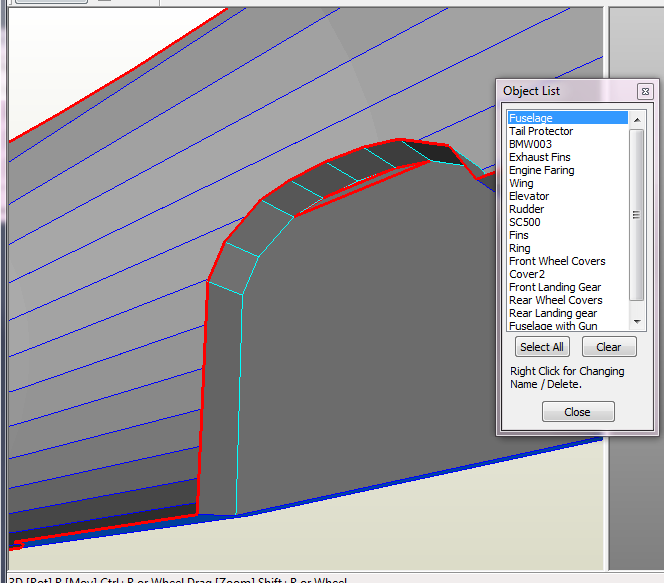
Metaseq can automatically fix some of those problems via the Object > Join closed vertices and the Object > Align Faces followed with the Object > Delete overlapped faces. Unfortunately, Metaseq can only do so much. I'll still need to manually search for those remaining problem faces and vertices.
After Pepakura loads the model, I can also find problem areas by manually inspecting each object and looking for open edges where there shouldn't by any open edges.
First the wing. There's a red open edge on the wheel well. That open edge shouldn't be there.
Need to fix that.. :(
Here's another one! Two open edges on the front landing gear wheel wells!
Here's another one... the bomb fins.
Oh well... cleaning this up will be a lot of work.
Notice anything different?
First, I added some missing pieces on the front landing gear.
Then, I decided to add gun ports.
Also added some finishing touches to the rear landing gears.
Finally, I added that thing in the tail. I don't know what it's called, but it's meant to protect the tail of the fuselage from being damaged during takeoff.
Now, before I start freezing of the mirrored objects, I'd better make sure I won't have any problems with Pepakura. Time to load the model into Pepakura!
And as expected...problems...lots of them.
X deleted vertices means that Pepakura encountered vertices that meet one or more of the following criteria:
- too close to each other
- not part of a face
Y deleted faces on the other hand means that a face meets one or more of the following criteria:
- overlaps another face (e.g. two faces share two or more edges)
- the face has surface area that is too small (just a hunch...)
Z deleted objects means that Pepakura encountered an object that has no faces defined under it.
Now this is annoying. Pepakura won't tell you WHAT FRIKKIN vertices and faces and objects were deleted! Instead, Pepakura will give you hours of fun trying to find out what caused those problem.
The easiest problem to solve is the deleted objects. Just make sure that you've got no "empty" objects in your model. And yes, even if an object has a child object, but no faces defined in it, it's still considered an "empty" object.
Deleted vertices and faces are a different matter.
Metaseq can automatically fix some of those problems via the Object > Join closed vertices and the Object > Align Faces followed with the Object > Delete overlapped faces. Unfortunately, Metaseq can only do so much. I'll still need to manually search for those remaining problem faces and vertices.
After Pepakura loads the model, I can also find problem areas by manually inspecting each object and looking for open edges where there shouldn't by any open edges.
First the wing. There's a red open edge on the wheel well. That open edge shouldn't be there.
Need to fix that.. :(
Here's another one! Two open edges on the front landing gear wheel wells!
Here's another one... the bomb fins.
Oh well... cleaning this up will be a lot of work.
Labels:
aircraft,
card model,
design,
Henschel,
hs-132,
luft46,
Metasequoia,
Pepakura
Sunday, May 27, 2012
Henschel HS-132 - Part 12
Last week, I stopped working after finishing the front landing gear wheel wells.
Now I'm going to start working on the rear wheel wells.
As in my last post, I start by cloning the rear landing gears, and "raising" the cloned landing gear by rotating along the Z-Axis. You may notice on the picture above that the gear shaft kinda bulges out of the wings. This was intentional. I had to make the landing gear shaft a bit "fat" since I'll be printing this on card stock. Card stock is difficult to roll very thin. As a compromise, I made the shafts "fat" to allow for easier rolling.
Now, I've created the rear wheel well template what I'll use to carve out the actual wheel wells.
Here's what I ended up with after subtracting the rear wheel well template from the wing.
Now it's time to make the wheel covers. I'll do this by getting the intersection between the wheel well template and the wing.
And here we are... what a mess! I sure wish that some day, O. Mizuno (the guy who wrote Metaseq) would create his own BOOLEAN operation plugin to replace the old one.
Now for the clean up process. Since I only need to make the wheel covers, I start by removing the unneeded edges and vertices.
To help with the cleanup, I'll un-hide the wing. Then I'll change the edge colors so that I'll "see" which edge belongs to what object.
To clean up the wheel covers, I'll remove the vertices that have no "partner" vertex with the wing. This is where having a different edge and vertex coloring helps. (See picture above.)
And finally, rear wheel wells and covers done!
Now I'm going to start working on the rear wheel wells.
As in my last post, I start by cloning the rear landing gears, and "raising" the cloned landing gear by rotating along the Z-Axis. You may notice on the picture above that the gear shaft kinda bulges out of the wings. This was intentional. I had to make the landing gear shaft a bit "fat" since I'll be printing this on card stock. Card stock is difficult to roll very thin. As a compromise, I made the shafts "fat" to allow for easier rolling.
Now, I've created the rear wheel well template what I'll use to carve out the actual wheel wells.
Here's what I ended up with after subtracting the rear wheel well template from the wing.
Now it's time to make the wheel covers. I'll do this by getting the intersection between the wheel well template and the wing.
And here we are... what a mess! I sure wish that some day, O. Mizuno (the guy who wrote Metaseq) would create his own BOOLEAN operation plugin to replace the old one.
Now for the clean up process. Since I only need to make the wheel covers, I start by removing the unneeded edges and vertices.
To help with the cleanup, I'll un-hide the wing. Then I'll change the edge colors so that I'll "see" which edge belongs to what object.
To clean up the wheel covers, I'll remove the vertices that have no "partner" vertex with the wing. This is where having a different edge and vertex coloring helps. (See picture above.)
And finally, rear wheel wells and covers done!
Labels:
aircraft,
card model,
design,
Henschel,
hs-132,
luft46,
Metasequoia,
Pepakura
Subscribe to:
Posts (Atom)